
Gym & Studio Websites in Calgary — Turning Class Schedules Into Bookings
A gym or studio website that simply displays a class schedule isn’t actually a booking tool — it’s a brochure with a timetable printed on it. The visitor still has to figure out how to reserve a spot, whether there’s a waitlist, whether they need an account first, and whether the class is even still open. Every one of those extra steps is a place someone gives up and picks a different studio, or just doesn’t book at all.
This guide is specifically about the booking flow — not general fitness website design tips, which are covered everywhere. It uses the Aegis Elite Fitness redesign, a Calgary gym rebuild that led to a 40% increase in class bookings, as the working example throughout.
Table of Contents
Why “Showing the Schedule” Isn’t the Same as Booking
Most gym websites treat the class schedule as a display problem: list the classes, times, and instructors, and the job is done. But the actual conversion event isn’t “visitor saw the schedule” — it’s “visitor is now booked into a specific class.” Those are very different UX problems.
A schedule that requires someone to note down a class time, then navigate to a separate booking app or portal, then create an account, then search for the same class again, has multiple points where a motivated visitor becomes an unmotivated one. Every additional step between “I want to try this class” and “I’m booked” measurably reduces how many people actually complete it.
Did You Know? According to Think with Google, a majority of mobile users abandon a task if it feels slow or overly complicated — and for a gym website, “complicated” often means the booking flow itself, not the page load time.
The Aegis Elite Redesign: What Actually Drove More Bookings
Aegis Elite Fitness, a Calgary gym, came to me with a website that listed its schedule clearly but required visitors to leave the site entirely, open a separate booking portal, and re-search for the class they’d just seen. The redesign focused on closing that gap:
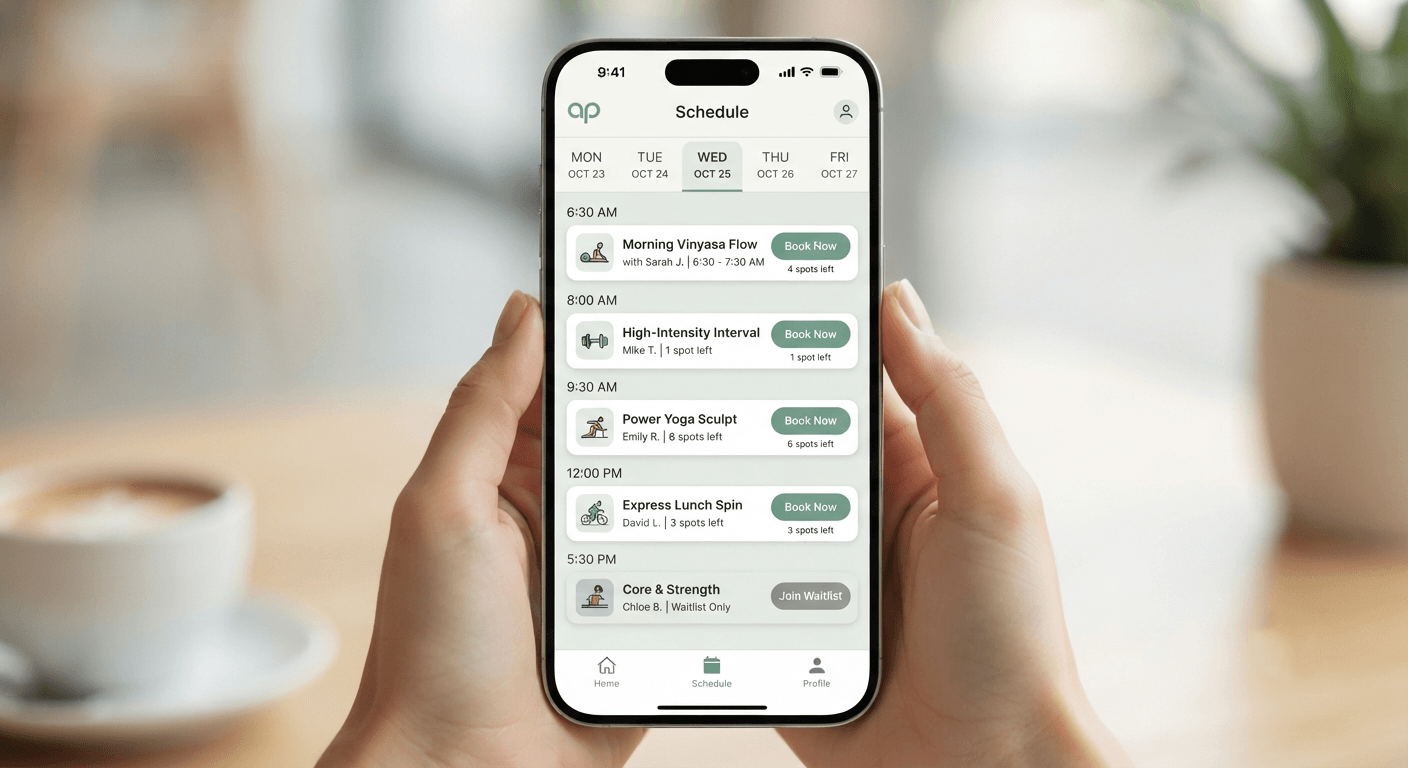
- Class schedule and booking action combined on one page — no separate portal to navigate to first.
- One-tap booking directly from the schedule view, rather than a multi-step form.
- Clear first-timer path — a distinct, prominent option for someone trying the gym for the first time, separate from existing-member booking.
The result was a 40% increase in class bookings after launch — driven almost entirely by removing friction from the path between “found the class” and “reserved a spot,” not by a visual redesign. See the full case study →
Anatomy of a Booking Flow That Converts
Every high-converting gym or studio booking flow I build follows the same underlying structure, regardless of the booking software behind it:
- Class and time visible together with an immediate booking action — not a separate “view schedule” and “book a class” page.
- Minimum required information to book — name, email or phone, and the class slot. Anything beyond that (detailed intake forms, waivers) can come after the booking is confirmed, not before.
- Instant confirmation, ideally with a calendar-add option, so the visitor has a concrete next step rather than uncertainty about whether the booking went through.
- A visible cancellation or reschedule path — knowing they can change plans easily actually makes people more comfortable booking in the first place.
Pro Tip: If your booking software forces a separate login or account creation before a first-time visitor can book a single trial class, that account-creation step is very likely costing you bookings. Where the platform allows it, offer a guest-checkout style booking for first-timers.
Class Schedule Page Design: Beyond a Static Timetable
A schedule page needs to do more than list times — it needs to help someone decide, at a glance, which class is right for them.
What works:
- Class type, instructor, difficulty level, and remaining spots shown together, not requiring a click into each class individually to see availability
- Clear filtering by day, class type, or time of day for gyms with a large schedule
- A distinct visual treatment for classes that are nearly full or waitlisted, so visitors aren’t disappointed after going through the booking flow
What doesn’t work:
- A schedule embedded as an image or PDF, which can’t be filtered, isn’t mobile-friendly, and isn’t indexable by Google
- Requiring a click into a separate page per class just to see whether it’s full
Handling Waitlists, Capacity, and First-Timer Friction
Popular classes filling up is a good problem to have — but only if the website handles it well.
- Waitlist functionality should be visible and simple, not a dead end that just shows “Class Full” with no next step.
- First-timer intro offers (a trial class, a discounted first visit) should have their own clear path, separate from the regular member booking flow, since a brand-new visitor has different questions and different hesitations than an existing member.
- Capacity should be shown honestly — “2 spots left” creates helpful urgency; a website that always shows availability regardless of actual capacity erodes trust the first time someone shows up to a class that’s actually full.
Mobile Booking UX: Where Most Gym Sites Fall Short
Most class bookings happen on a phone — often the same day, sometimes while someone is already commuting to the gym. A booking flow that works cleanly on desktop but requires pinch-zooming or awkward tapping on mobile is losing exactly the bookings most likely to convert.
Mobile booking checklist:
- Booking button is thumb-reachable, not requiring a stretch to the top of the screen
- Class time slots are tappable without accidentally selecting the wrong one
- Confirmation screen is clear and doesn’t require scrolling to find the “you’re booked” message
- No pop-ups interrupting the booking flow itself
- Add-to-calendar works cleanly on both iOS and Android
Membership Pages vs. Drop-In and Trial Booking Paths
A common mistake is designing the whole site around membership sales and treating drop-in or trial bookings as an afterthought — but for many gyms and studios, the trial or drop-in booking is the actual first conversion event that leads to membership later.
| Path | Best For | Common Mistake |
|---|---|---|
| Membership sign-up | Visitors who already know they want to commit | Making this the only visible path, burying trial options |
| Drop-in / single class booking | Visitors testing the studio or traveling | Requiring full account creation before a single booking |
| First-timer trial offer | New-to-fitness or new-to-studio visitors | No distinct, easy-to-find path separate from regular booking |
Each of these deserves its own clear, separate call-to-action rather than funneling every visitor through the same membership-focused flow.
Common Mistakes on Gym and Studio Websites
- Schedule and booking on separate platforms with no integration, forcing visitors to re-search for a class they already found.
- Schedules published as images or PDFs, which aren’t mobile-friendly and aren’t indexable by Google.
- No distinct first-timer path, treating brand-new visitors the same as existing members.
- Overly long intake forms required before booking, rather than after a class is already reserved.
- Hiding real-time capacity, leading to no-shows-turned-overbooking or a broken trust moment when someone arrives to a full class.
Booking Software Comparison for Gyms and Studios
| Platform | Strength | Consideration |
|---|---|---|
| Mindbody | Widely used, strong feature set | Can feel heavy for very small studios; embedding well on-site takes care |
| Glofox | Built specifically for boutique fitness | Smaller ecosystem than Mindbody |
| Custom-built booking flow | Full control over UX, tightly integrated with the site | Requires more upfront development, best for gyms with specific workflow needs |
The right choice depends less on the platform’s feature list and more on how well it can be embedded into a fast, mobile-first booking flow rather than existing as a separate, disconnected portal.
How I Build This for Calgary Gyms and Studios
- Map the actual booking journey first — schedule view, class selection, confirmation — before any visual design work starts.
- Integrate the booking system directly into the site, rather than linking out to a separate-feeling portal.
- Build a distinct first-timer / trial path, separate from the standard member booking flow.
- Test the full flow on real mobile devices, not just a resized browser window.
- Add AI chatbot support where it genuinely helps — answering hours, class-level questions, or membership pricing questions instantly, especially outside staffed hours.
This is the exact approach behind the Aegis Elite Fitness rebuild — see the full case study, browse the health & fitness industry page, or get a starting estimate for your gym or studio.
FAQ
What’s the difference between a class schedule page and a booking flow? A schedule page displays information; a booking flow lets a visitor actually reserve a spot without leaving the site or re-searching for the class on a separate platform. Many gym websites have the first without the second.
How did the Aegis Elite Fitness redesign increase bookings? By combining the class schedule and booking action into one page and creating a clear first-timer path, removing the friction of a separate booking portal — resulting in a 40% increase in class bookings.
Should I require an account before someone can book a trial class? Generally no. Requiring account creation before a first-time visitor can book a single class is a common source of drop-off — offer a simpler guest-booking path where your platform allows it.
Can my class schedule be a PDF? It’s better as an actual webpage. A PDF schedule can’t be filtered, doesn’t reflow well on mobile, and isn’t indexable by Google for search visibility.
What booking software works best for a Calgary gym or studio? It depends on your workflow — Mindbody and Glofox are common choices, but the more important factor is how well the booking flow is integrated into your actual website rather than existing as a disconnected portal.
Do I need a separate mobile app for bookings? Not necessarily. A well-built, mobile-first website booking flow can handle most gyms’ and studios’ needs without the added cost and adoption friction of a standalone app.
How should I handle waitlists on my website? Show them clearly, with an easy way to join rather than a dead-end “class full” message, and be honest about real-time capacity so visitors’ expectations match what they find when they arrive.
Should membership sign-up be the main call-to-action on my homepage? Not exclusively — many visitors aren’t ready to commit to membership yet but will book a trial or drop-in class. Give that path equal visibility rather than funneling everyone toward membership first.
Is an AI chatbot useful for a gym or studio website? It can be, especially for answering common questions (hours, class levels, pricing) outside staffed hours — but it’s most useful for higher-inquiry-volume gyms, not a strict requirement for every studio.
How much does a gym or studio website cost in Calgary? It depends on booking system integration complexity, but most fall in a similar range to other Calgary small business projects. Use the cost calculator for a specific estimate.
What’s the biggest mistake you see on gym websites? Treating the schedule as a display feature instead of a booking tool — requiring visitors to leave the site and re-search for a class on a separate platform is the single most common source of lost bookings.
Conclusion
A gym or studio website’s real job isn’t showing a class schedule — it’s getting someone from “interested” to “booked” with as few steps as possible. The Aegis Elite Fitness redesign is a clear example of what happens when that gap is closed: a 40% increase in class bookings came from combining the schedule and the booking action, not from a visual refresh.
If your current site shows a schedule but sends visitors somewhere else entirely to actually book, that’s a fixable structural problem. Read the full Aegis Elite Fitness case study, see more on the health & fitness industry page, or get a starting estimate for your gym or studio. If you’d rather talk it through directly, reach out here.
Written by
Sharjeel Bin Amir Founder of DevGurux · Freelance Web Developer, Calgary · WordPress Expert · AI Automation Specialist · SEO Consultant Read my full story →